Streamline Your Editorial Design with Biofold
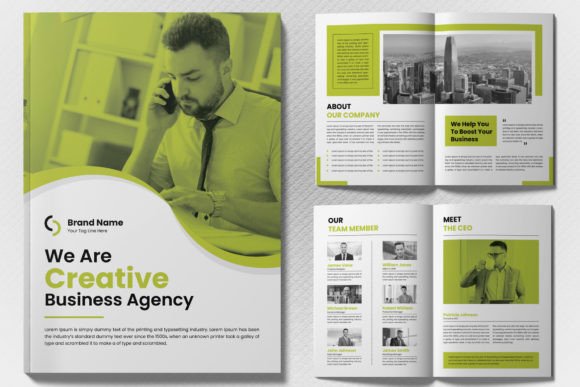
Let's be honest: the gap between a good idea and a finished publication is often filled with tedious formatting. You have the content, the photos, and the vision, but staring at a blank InDesign canvas can be paralyzing. This is where a solid foundation changes the game. If you're working on a magazine, lookbook, or comprehensive report, the Biofold Brochure Template Layout is built to bridge that gap. It’s not just a digital file; it’s a structured system designed to take the headache out of layout design, allowing you to focus on storytelling rather than pixel-pushing.
What sets this specific template apart is its architectural integrity. The "Biofold" name suggests a clean, organic flow, but under the hood, it is a powerhouse of modern typography and grid systems. It comes as an INDD (InDesign) file, which is the industry standard for professional editorial design. Because the file is 100% editable with well-organized layers, you aren't locked into a rigid structure. You can treat it like a set of high-quality LEGO bricks—rearranging, resizing, and recoloring to fit the exact vibe of your brand identity. Whether you are a seasoned designer handing off assets to a printer or a small business owner creating your first company profile, the learning curve is virtually non-existent.
Practical Applications for Modern Brands
When we talk about "brochure templates," people often think of outdated tri-folds gathering dust in a lobby. However, the Biofold Brochure Template Layout redefines this category for the digital age. Its A4 paper size and CMYK color scheme make it perfectly optimized for print, but its versatility extends far beyond the physical page.
Here is how different creatives are utilizing this asset to save time and elevate their output:
- Corporate Branding & Pitch Decks: For startups and agencies, consistency is king. Using this template ensures that every slide of your pitch deck or every page of your annual report shares the same visual DNA. It reinforces brand recognition through consistent spacing and typography, making your business look established and trustworthy.
- Creative Portfolios & Lookbooks: Photographers and fashion designers need layouts that let the images breathe. The clean margins and balanced white space in this template ensure that your visuals remain the hero of the page. It acts as a silent partner, supporting your work without overshadowing it.
- Digital Products & Lead Magnets: If you are a blogger or content creator, offering a beautifully designed PDF guide is a proven way to grow your email list. Instead of struggling with Word documents, you can use this template to create a premium digital product that feels substantial and valuable to your audience.
- Event Programs & Menus: For event planners or restaurant owners, having a print-ready file that is easy to update is crucial. You can quickly swap out text and images for seasonal menus or event schedules without breaking the layout's flow.
Mastering Visual Communication and Readability
A template is only as good as its ability to communicate information. The Biofold Brochure Template Layout excels here because it prioritizes readability. The designers behind it have already done the heavy lifting regarding hierarchy—deciding which text should be the display font header and which should be the body copy. This allows you to structure your content logically, guiding the reader’s eye from the headline to the sub-headline, and finally to the call to action.
For those worried about the technical side of fonts, this template takes the stress out of licensing. It utilizes free fonts, which is a massive relief for commercial projects. You don't need to worry about purchasing expensive commercial font licenses or accidentally violating copyright laws. The included documentation provides direct links to download these typefaces, ensuring that the file renders exactly as intended once you open it.
Furthermore, the design is intentionally neutral yet stylish. It acts as a chameleon, adapting to various design styles. Whether you are going for a minimalist corporate look, a vibrant creative aesthetic, or a sophisticated editorial vibe, the structure supports it. By simply changing the color palette and swapping the placeholder images, you can completely transform the mood of the document.
Streamlining Your Workflow
Time is the one resource we can't get back. The primary value of the Biofold Brochure Template Layout is efficiency. Because it is an instant download, you can go from purchase to production in minutes. The file is organized with a logic that makes sense to professional designers—groups are labeled, layers are separated by function, and master pages are set up for easy pagination.
If you are new to Adobe InDesign, don't be intimidated. The structure of this template actually helps you learn the software. By deconstructing how the template is built, you can see how professional layouts are assembled. You can see how text boxes link, how images are placed, and how paragraph styles are used to maintain visual consistency across dozens of pages.
Consider the alternative: building a 30-page magazine layout from scratch. You would spend hours setting up margins, baseline grids, and paragraph styles. With this asset, that foundation is already there. You simply need to "pour" your content into the vessel. This allows you to spend your energy on the creative side—curating the best photos, writing compelling copy, and refining your message—rather than getting bogged down in the technical setup.
Final Thoughts on Elevating Your Print Materials
In a world saturated with digital noise, high-quality print materials still command attention. A well-produced brochure or magazine suggests permanence and quality. It tells your audience that you care about the details.
The Biofold Brochure Template Layout is more than just a pre-made design; it is a tool for professional communication. It empowers entrepreneurs, designers, and marketers to produce work that rivals big-budget agencies without the associated overhead. By leveraging this easy edit template, you ensure that your next project isn't just finished—it's polished, professional, and perfectly aligned with your goals. If you are ready to stop wrestling with software and start producing stunning layouts, this is the practical solution you’ve been looking for.