Halloween-Ticket: Your Shortcut to Spooky Event Invites
Planning a Halloween event often feels like a race against time. Between organizing the guest list, arranging the decorations, and planning the menu, designing the actual invitations usually falls to the bottom of the pile. You want something that looks professional and screams "Halloween," but you don't have the budget to hire a graphic designer or the hours to learn complex software. This is where a high-quality Halloween-Ticket template changes the game. It serves as a foundational design asset that bridges the gap between a raw idea and a polished, printable product, allowing you to focus on the party itself rather than pixel-pushing.
The Practical Appeal of an Editable Template
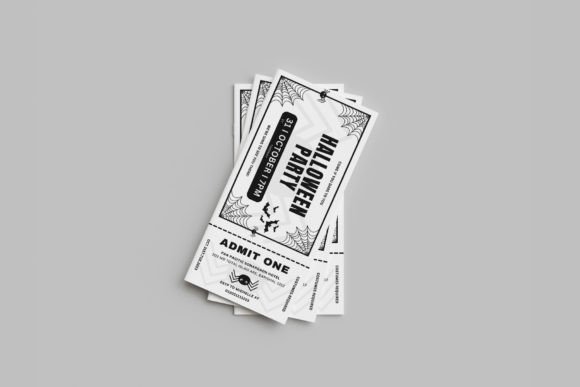
For small business owners, event planners, or even parents throwing a neighborhood bash, the primary value of a template lies in its efficiency. The specific Halloween-Ticket design we are looking at offers a standard dimension of 8 x 3.5 inches. This is crucial because it fits perfectly into standard envelopes and works seamlessly with most ticket stub systems. However, beyond just the measurements, the real utility comes from the file format. By utilizing a Canva template, the barrier to entry is virtually non-existent. You don't need a subscription to Adobe Creative Cloud or knowledge of layers and vectors. If you can drag and drop a mouse, you can customize this ticket.
Think about the visual hierarchy of a ticket. It needs to convey information quickly: the event name, the date, the location, and perhaps a price or a dress code. This template is designed with that visual communication in mind. The layout is already balanced, meaning you aren't starting from a blank canvas where you might accidentally make the text too small or crowd the edges. It provides a professional presentation right out of the box, ensuring that your brand identity (or party theme) is communicated clearly the moment the recipient looks at it.
Customization: Making the Design Your Own
One of the most common pitfalls with generic templates is the inability to truly make them fit a specific aesthetic. A "spooky" design for a kids' party looks vastly different from one for a corporate "Fright Night." This is where the features of this specific asset shine. Because all text is editable and you can change colors, fonts, and backgrounds, the versatility is immense.
Imagine you are a small business owner hosting a Halloween sale. You can take this Halloween-Ticket template, change the background to match your brand colors, swap the playful font for a more serious serif font or a sleek sans serif font, and instantly turn a party invite into a voucher for a discount. The drag and drop interface allows you to upload your own logos or specific imagery. If you are a content creator, you might use this to create mock-ups for your Instagram feed, showcasing how you organize digital events. The ability to alter the text color and size ensures that the most important details—like the "Admit One" line—pop exactly how you want them to.
Beyond the Invite: Diverse Creative Applications
While the primary function is obviously an invitation, thinking of this design solely as a ticket limits its potential. In the world of visual communication, assets are often repurposed. Here is how you can leverage this editable template across different mediums:
- Social Media Graphics: The 8x3.5 ratio is excellent for Instagram Stories or Pinterest pins. You can use the design to create "Save the Date" graphics that drive engagement.
- Packaging Design: If you sell physical goods—like candles, baked goods, or crafts—you can scale this design down to create hang-tags for your Halloween seasonal products.
- Digital Products: For those selling digital downloads, such as planners or party kits, this ticket design can be included as a bonus insert, adding value to your offering.
- Editorial Layouts: If you are writing a blog post about Halloween party planning, using this ticket as a visual element within your text breaks up the monotony and adds a thematic flair.
The fact that the file is CMYK and Print ready is a technical detail that shouldn't be overlooked. Many free online templates are only in RGB (screen) color mode. When you try to print them, the colors often look dull or muddy. This template is prepared for the printer, meaning what you see on screen is what you get on paper. This is essential for marketing assets where color accuracy impacts brand recognition.
Typography and Readability Considerations
Even with a pre-designed layout, choosing the right typography is vital for readability. The template mentions the use of free fonts, which is a massive advantage for commercial use. You don't want to fall into the trap of using a font that requires a license fee for every print run.
When customizing, consider the hierarchy of your information. Use a bold, decorative display font for the headline (e.g., "Haunted Gala"), but switch to a clean, legible modern typography style for the smaller details like the address or time. A common mistake is using a script font or handwritten font for the fine print. While these look beautiful for headers, they can become illegible at small sizes, especially when printed. Stick to a sturdy sans serif for the data points to ensure your guests can actually read the information.
Testing your font pairing is also recommended. If you change the main headline font, make sure the secondary font complements it rather than competes with it. A good rule of thumb is to pair a highly stylized font with a very neutral one. This contrast creates visual interest while maintaining a clean, professional look.
Streamlining Your Workflow
Ultimately, the goal of using a Halloween-Ticket template is to streamline your creative workflow. For the entrepreneur, time is money. Spending four hours trying to align text boxes in a complex design program is not a productive use of resources. By utilizing a system that is "Very Easy to Customize," you reduce the production time to a matter of minutes.
The inclusion of a PDF instruction file is a thoughtful touch that ensures even the most novice user can get started without frustration. It acts as a roadmap, guiding you through the customization process in Canva. This focus on user experience allows you to maintain visual consistency across your event materials. You can quickly duplicate the page within Canva to create matching raffle tickets, VIP passes, or door prizes, ensuring your entire event feels cohesive and well-planned.
Whether you are a crafter looking to sell on Etsy, a marketer planning a seasonal campaign, or just someone wanting to throw a memorable party, having a reliable, editable template in your toolkit is invaluable. It removes the technical hurdles of design, leaving you free to focus on the creative aspects of your project. With the ability to change every element to suit your needs, this asset isn't just a ticket—it's a versatile foundation for your Halloween creative projects.